What is OAuth? How the open authorization framework works
What is OAuth?
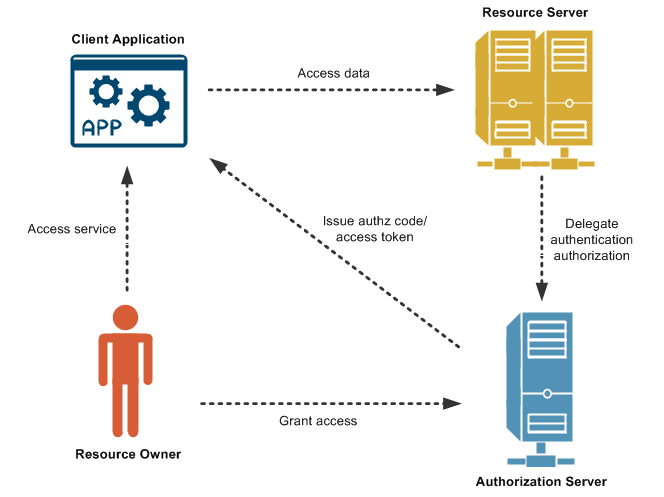
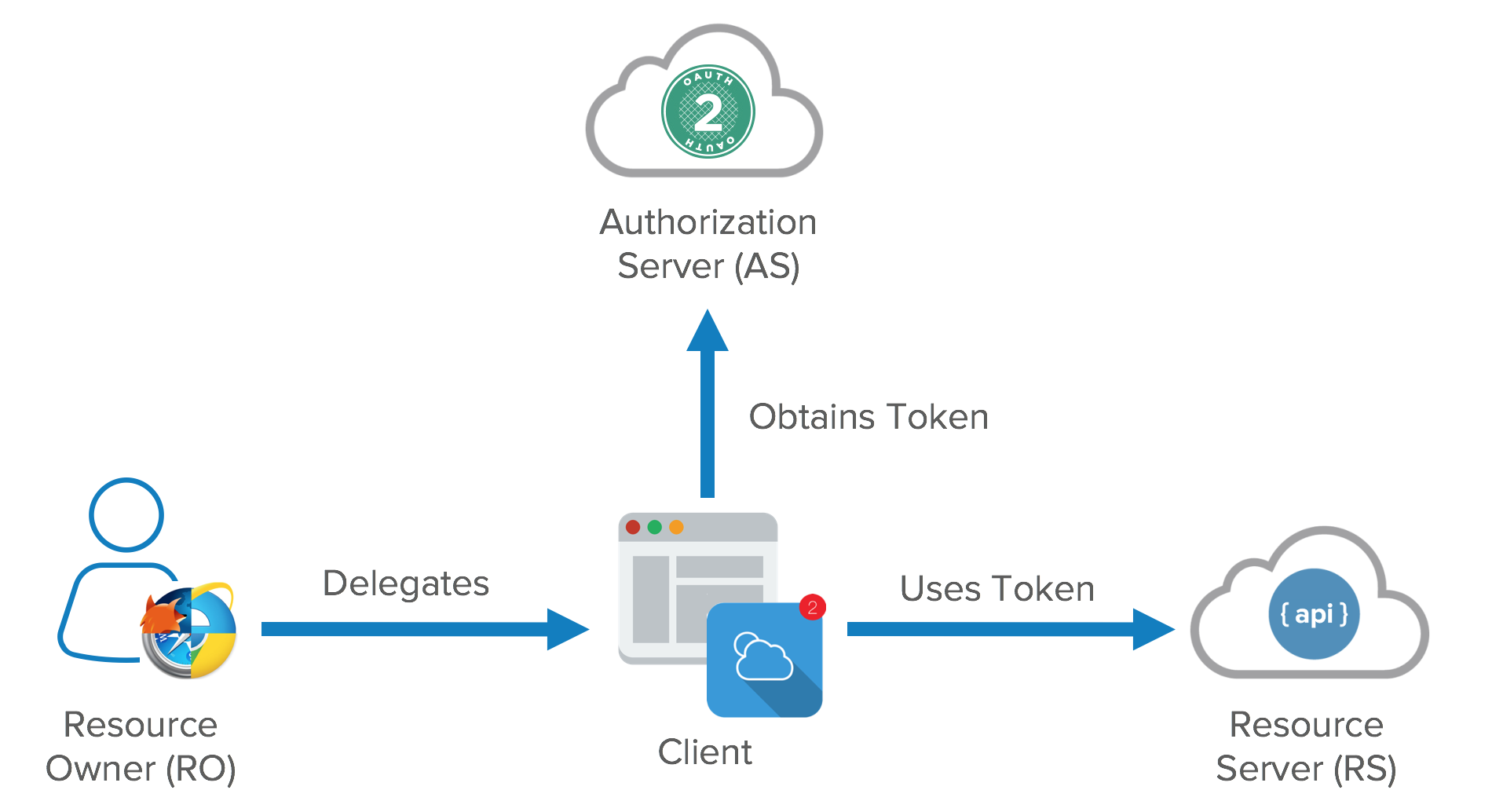 OAuth is an open-standard authorization protocol or framework that describes how unrelated servers and services can safely allow authenticated access to their assets without actually sharing the initial, related, single logon credential. In authentication parlance, this is known as secure, third-party, user-agent, delegated authorization.
Give an example of what using OAuth would look like.
The simplest example of OAuth is when you go to log onto a website and it offers one or more opportunities to log on using another website’s/service’s logon. You then click on the button linked to the other website, the other website authenticates you, and the website you were originally connecting to logs you on itself afterward using permission gained from the second website.
How does OAuth work? What are the steps that it takes to authenticate the user?
Let’s assume a user has already signed into one website or service (OAuth only works using HTTPS). The user then initiates a feature/transaction that needs to access another unrelated site or service. The following happens (greatly simplified):
-
The first website connects to the second website on behalf of the user, using OAuth, providing the user’s verified identity.
-
The second site generates a one-time token and a one-time secret unique to the transaction and parties involved.
-
The first site gives this token and secret to the initiating user’s client software.
-
The client’s software presents the request token and secret to their authorization provider (which may or may not be the second site).
-
If not already authenticated to the authorization provider, the client may be asked to authenticate. After authentication, the client is asked to approve the authorization transaction to the second website.
-
The user approves (or their software silently approves) a particular transaction type at the first website.
-
The user is given an approved access token (notice it’s no longer a request token).
-
The user gives the approved access token to the first website.
-
The first website gives the access token to the second website as proof of authentication on behalf of the user.
-
The second website lets the first website access their site on behalf of the user.
-
The user sees a successfully completed transaction occurring.
-
OAuth is not the first authentication/authorization system to work this way on behalf of the end-user. In fact, many authentication systems, notably Kerberos, work similarly. What is special about OAuth is its ability to work across the web and its wide adoption. It succeeded with adoption rates where previous attempts failed (for various reasons).
What is OpenID?
OpenID began life in 2005 as a means for logging into the then-popular LiveJournal blogging site but quickly spread to other sites. The idea, in the early days of Web 2.0, was that rather than having multiple logins for multiple websites, OpenID would serve as a single sign-in, vouching for the identities of users. But in practice OpenID was difficult to implement on the developer side, and never really became that appealing to users, especially as there was competition in that space. By 2011, OpenID had become an also-ran, and, Wired declared that “The main reason no one uses OpenID is because Facebook Connect does the same thing and does it better. Everyone knows what Facebook is and it’s much easier to understand that Facebook is handling your identity than some vague, unrecognized thing called OpenID.” (Facebook Connect turned out to not be a world-beater either, but at least people knew what Facebook was.)
What is the difference between authorization and authentication?

What is Authorization Code Flow?
Because regular web apps are server-side apps where the source code is not publicly exposed, they can use the Authorization Code Flow, which exchanges an Authorization Code for a token.
- Authorization Code Flow
- Add Login Using the Authorization Code Flow
- Call API Using the Authorization Code Flow
What is Authorization Code Flow with Proof Key for Code Exchange (PKCE)?
During authentication, mobile and native applications can use the Authorization Code Flow, but they require additional security. Additionally, single-page apps have special challenges. To mitigate these, OAuth 2.0 provides a version of the Authorization Code Flow which makes use of a Proof Key for Code Exchange (PKCE).
- Authorization Code Flow with Proof Key for Code Exchange (PKCE)
- Add Login Using the Authorization Code Flow with PKCE
- Call API Using the Authorization Code Flow with PKCE
What is Implicit Flow with Form Post?
s an alternative to the Authorization Code Flow, OAuth 2.0 provides the Implicit Flow, which is intended for Public Clients, or applications which are unable to securely store Client Secrets. While this is no longer considered a best practice for requesting Access Tokens, when used with Form Post response mode, it does offer a streamlined workflow if the application needs only an ID token to perform user authentication.
- Implicit Flow with Form Post
- Add Login Using the Implicit Flow with Form Post
- Authenticate SPAs with Cookies
What is Client Credentials Flow?
With machine-to-machine (M2M) applications, such as CLIs, daemons, or services running on your back-end, the system authenticates and authorizes the app rather than a user. For this scenario, typical authentication schemes like username + password or social logins don’t make sense. Instead, M2M apps use the Client Credentials Flow (defined in OAuth 2.0 RFC 6749, section 4.4).
- Client Credentials Flow
- Call API Using the Client Credentials Flow
What is Device Authorization Flow?
With input-constrained devices that connect to the internet, rather than authenticate the user directly, the device asks the user to go to a link on their computer or smartphone and authorize the device. This avoids a poor user experience for devices that do not have an easy way to enter text. To do this, device apps use the Device Authorization Flow (drafted in OAuth 2.0). For use with mobile/native applications.
- Device Authorization Flow
- Call API Using the Device Authorization Flow
What is Resource Owner Password Flow?
Though we do not recommend it, highly-trusted applications can use the Resource Owner Password Flow, which requests that users provide credentials (username and password), typically using an interactive form. The Resource Owner Password Flow should only be used when redirect-based flows (like the Authorization Code Flow) cannot be used.
- Resource Owner Password Flow
- Call API Using the Resource Owner Password Flow